If you exported footage from a DVR or security camera system, you may have noticed the .DAV file format. DAV is not widely supported by everyday media players and editors, and compatibility can vary depending on the recorder that created the file. In this guide, you'll learn what a DAV file is, how to convert it to common video formats like MP4 or AVI, and how to extract the audio as MP3 or WAV when you only need the sound.

Q: I have a video in .dav format. A Google search suggests it may be something that came from a DVR. I found an app that claims to supposedly convert DAV file to AVI but it just end with a 0kb size AVI file when the original DAV is 200MB. Any good DAV to MP4 or AVI video converter free download? Thanks.
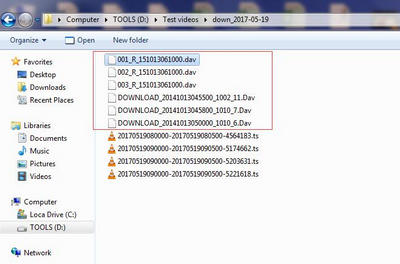
Can’t Open DAV Files Directly
Q: I was wondering if there is a way to edit/recode DAV video files. I have downloaded them from my security camera system but cannot read or edit them. Is there any .DAV file player or a guide to teach me how to convert DAV file to MP4 or other formats?
Q: My car was broken into last night and someone stole some of my tools. I have some CCTV camera footage but they're saved in DAV format and won't play. How to open DAV file? Anyone have a .DAV format converter that can get this done ASAP!!
DAV compatibility is inconsistent because different DVR and CCTV systems can create DAV files with vendor-specific headers, metadata, or protection. Some DAV files may open in a vendor player or even VLC, while others fail to load in common media players and editors.
If you need a more widely compatible copy, convert the DAV recording to a standard video or audio format. Here I will use WonderFox HD Video Converter Factory Pro for the conversion.
DAV is less widely supported than common media formats, but WonderFox HD Video Converter Factory Pro can import supported DAV recordings and convert them to 500+ output formats and device profiles. Besides MP4, AVI, MKV, and MPG, you can choose audio formats such as MP3 or WAV to keep only the soundtrack. The program also supports batch conversion and basic editing tools such as trim, merge, crop, rotate, and flip.
The whole DAV conversion is quite easy with the simple interface. Follow my steps to master the conversion steps.
Preparation: Download the DAV converter, install it on your Windows computer, and then launch it.
Open the Converter module and drag your DAV file into the window. You can also click the center + button or the upper-left + Add Files button to import it.
The program supports batch conversion, so you can add multiple DAV files at once.
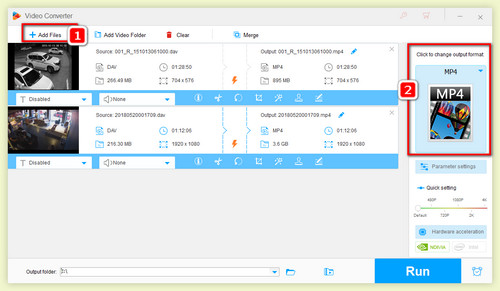
Load the DAV files
Click the output format image to open the format library. There are more than 500 presets available for different purposes.
For normal playback or editing, open the Video category and choose a format such as MP4, AVI, MKV, or MPG.
If you only need the audio from the surveillance recording, open the Audio category and choose MP3, WAV, or another audio format.
You can also open Parameter settings to adjust bitrate, sample rate, channels, and other available settings. Note that using a very high MP3 bitrate will not restore detail that is missing from low-quality source audio.
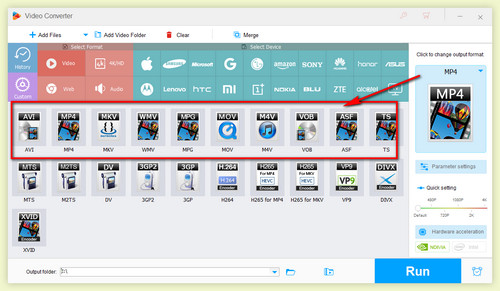
Choose a Video or Audio Output Format
You can choose a different target destination for saving the output file by clicking the inverted triangle button at the bottom of the software.
Finally, press the Run button to start converting your DAV file(s).
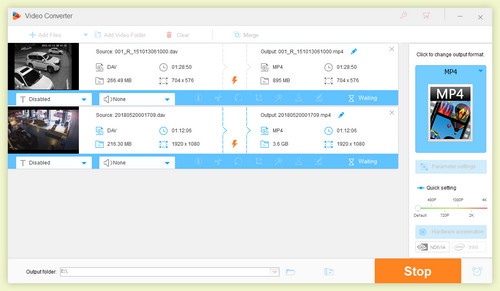
Start Converting DAV Files
After conversion, the new video file should be easier to play, edit, or share in compatible software. If you selected MP3, WAV, or another audio profile, the output contains the extracted audio rather than the video.
Tips: If your DVR exports many short clips, you can merge multiple converted clips into one video. If you only need a specific event or sound segment, you can trim the recording before or after conversion to avoid processing unnecessary footage.
If you do not want to install software, Online-Convert is one web-based option that currently lists DAV as an input format and provides DAV conversion to formats such as MP4, AVI, MP3, WAV, and more. This can be convenient for a small, non-sensitive file, but keep in mind that online conversion requires uploading your surveillance footage to a third-party server.
To start the DAV file conversion online:
Step 1. Open Online-Convert and choose the target format, such as MP4 or MP3.
Step 2. Click Choose File to upload your DAV file.
Step 3. Adjust the available video or audio settings if needed.
Step 4. Click Start to begin the conversion.
Step 5. Download the converted file after the task finishes.
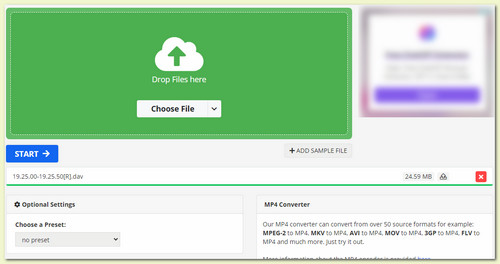
Convert DAV Files Online
Online-Convert currently limits free uploads to 100 MB. For larger files, batch jobs, slow upload connections, or footage you prefer not to upload, a desktop DAV converter is usually the more practical choice.
A DAV file is a proprietary surveillance recording file used by some DVR/NVR and CCTV systems. It can contain recorded video, audio, timestamps, and other recorder-specific information. The exact structure may vary between manufacturers and recorder models, which is one reason a DAV file that works in the vendor's player may fail in a general-purpose media player or editor. Some recordings may also be protected or exported in a way that requires the original vendor software.
If your DAV file can be imported successfully, WonderFox HD Video Converter Factory Pro can convert it to a more common video or audio format for easier use. If a DAV file cannot be opened at all, first try the playback/export utility supplied by the DVR or camera manufacturer and re-export the recording to MP4, AVI, or another standard format when that option is available.
Q1. Can I convert DAV to MP3?
Yes. In Step 2 above, choose Audio > MP3 instead of a video profile. This extracts the audio track from the DAV recording. WAV and other supported audio formats are also available.
Q2. Can VLC convert DAV files?
VLC includes a Media > Convert / Save feature and can create video/audio output when it can successfully read the source file. However, DAV compatibility varies, so this method may work for some recordings and fail for others.
Q3. Why can't my DAV file be imported?
The file may use a vendor-specific DAV variant, protection, or an incomplete/corrupted export. Try opening it with the original DVR/CCTV vendor software first. If possible, export a standard copy from that program and then convert or edit the exported file.

Kevincy joined the WonderFox team in 2014 and has been a senior columnist ever since. With over two decades of experience in the video editing industry, he shares tutorials, tips, and how-to guides on video/audio processing and personal DVD backups. Family-oriented and passionate about helping others, he is dedicated to making video and audio processing easier for readers.


More Special Features of HD Video Converter Factory Pro
Convert Video | Rip DVD | Download Video | Play Video | Share Media Files | Record Screen | Edit Video | Toolbox | Third-party Software | Kodi
About | Contact | Affiliate | Privacy | News | Copyright © 2009-2026 WonderFox Soft, Inc. All Rights Reserved.
 Free Download
 Recommended by the author