High-resolution videos are now common on phones, cameras, drones, TVs, and video-sharing platforms. Whether your footage is 720p HD, 1080p Full HD, 2K, or 4K UHD, you may need to remove unwanted parts, crop black bars, fix the orientation, combine clips, add subtitles, reduce file size, or convert the video to a more compatible format.
A practical HD/4K video editor should help you finish these everyday tasks without a steep learning curve. For quick edits, a lightweight converter-editor can be more efficient than a complicated professional timeline program.
Edit HD and 4K Videos Easily
WonderFox HD Video Converter Factory Pro is an all-in-one Windows program for users who want to edit, convert, compress, and manage high-resolution videos in one place. It supports common editing operations such as trimming, cropping, rotating, merging, adding subtitles, applying effects, adding watermarks, adjusting parameters, and exporting videos to popular formats and device presets.
Unlike professional video editors that focus on complex multi-track timelines, this program is built for simple and frequent video tasks. You can cut a 4K video, crop it for a different screen size, add subtitles, reduce its file size, and export it to MP4 without switching between multiple tools. It is especially useful when a video is too large, uses an incompatible codec, or cannot play smoothly on your device.
Besides editing, the software also includes video conversion, video compression, video downloading, screen recording, GIF making, and other practical tools. Hardware acceleration and batch processing can help you process multiple HD or 4K files more efficiently. Free download the HD/4K video editing software here.
Open WonderFox HD Video Converter Factory Pro. The interface is intuitive and friendly. The program consists of five main modules: Converter, Downloader, Recorder, GIF Maker, and Toolbox. To edit a video, open the Converter module first.
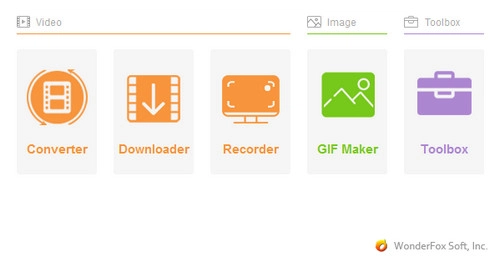
Open Converter to Start Editing
Click "Add Files" to import your video, or drag and drop files into the program directly. You can add one video for a quick edit or add a folder containing multiple videos for batch conversion and processing.
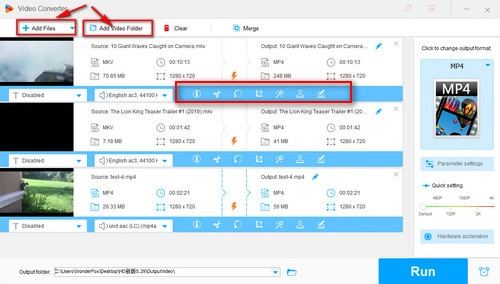
Import HD or 4K Video Files
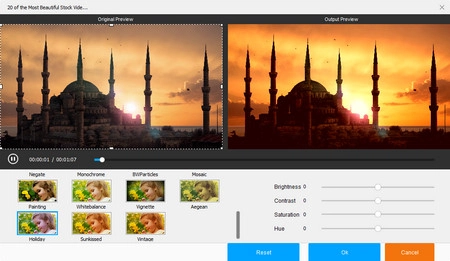
After the video is imported, you will see a toolbar beneath the file. Use the corresponding buttons to trim, split, merge, crop, rotate, flip, add subtitles, apply effects, or add a watermark. When you finish editing, click "OK" to save the changes.
These tools are useful for common tasks such as removing the beginning or ending, cutting a long 4K recording into smaller clips, cropping black bars, fixing a sideways phone video, or combining several short videos into one file.
Tips: For related tutorials, you can also read How to Edit 1080P Video, How to Cut 4K Video, and How to Edit AVCHD Videos.
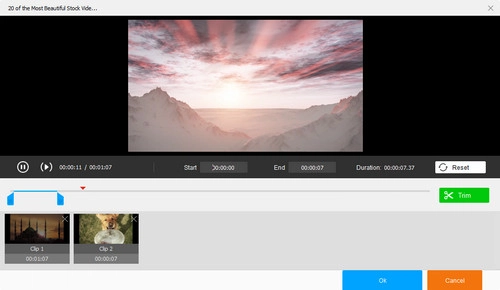
Trim, Split, Crop, Rotate, and More
Open the output format list on the right and choose the format or device preset you need. MP4 with H.264 is a safe choice for general playback and sharing, while HEVC/H.265 is useful when you want a smaller file size with good visual quality.
Then click "Parameter settings" to change video and audio parameters, including resolution, bitrate, frame rate, aspect ratio, deinterlacing, audio channel, sample rate, and volume. For large 4K videos, lowering the bitrate or choosing a more efficient codec such as HEVC/H.265 can help reduce the output file size.
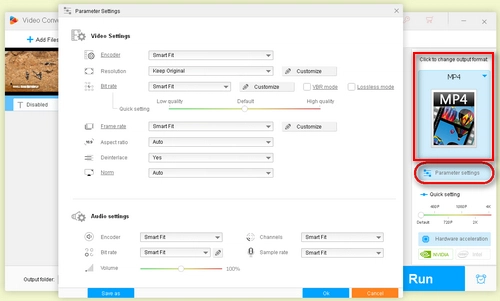
Adjust Video and Audio Parameters
Click the inverted triangle icon at the bottom of the interface to choose an output folder. Finally, click the "Run" button to export the edited video.
WonderFox HD Video Converter Factory Pro is suitable for quick edits, conversion, compression, and everyday high-resolution video processing. If you need a full timeline editor with multi-track editing, advanced transitions, color grading, motion graphics, or professional audio tools, the following 4K video editors may be worth considering.
| Software | Best for | Note |
|---|---|---|
| CyberLink PowerDirector | Beginners who want timeline editing and richer effects | Offers templates, effects, transitions, and a more complete editing workflow. |
| Pinnacle Studio Ultimate | Windows users needing advanced 4K and 360 video editing | A more advanced editor with motion tracking, multicam editing, split screen video, and masking tools. |
| Final Cut Pro | Mac users and creators | A professional Mac-only editor for creators who want a streamlined editing workflow. |
| Adobe Premiere Pro | Professional editors | Powerful and flexible, but it requires stronger hardware for smooth 4K editing. |
| Vegas Pro | Windows power users | The current product name is Vegas Pro, not Sony Vegas Pro. It is designed for advanced timeline editing, effects, and audio workflows. |
Choose the tool according to your actual task. For cutting, cropping, rotating, merging, compressing, and converting HD or 4K videos, a simple all-in-one tool is often faster. For advanced color correction, cinematic effects, motion graphics, multi-track editing, or professional audio mixing, a dedicated timeline editor is more suitable.
Besides being a high-resolution video editor, WonderFox HD Video Converter Factory Pro is also an all-in-one video converting program. It includes 500+ output formats and optimized profiles for portable devices, TVs, game consoles, and media players. It can convert common SD, HD, Full HD, and 4K videos while helping you keep a good balance between quality, compatibility, and file size. Learn more about how to convert SD video to HD video>>
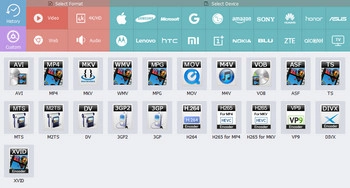
Supported formats and devices
Apart from format conversion and video editing, another useful feature is to compress 4K UHD video or reduce video file size for easier storage, transfer, and sharing. If you want to process videos recorded by a camcorder, DV, action camera, or other device, this versatile program can also help convert MTS video, AVCHD videos, DV to MP4, and GoPro videos.
A versatile online video downloader is available in WonderFox HD Video Converter Factory Pro. You can download online videos, audio files, or playlists and then convert them to the format you need for convenient playback. Learn more about how to download online videos using URL >>
Its video editing tools let you personalize your media files easily. Learn more below:
※ How to Add Subtitles to Video
※ How to Add a Picture to a Video
※ How to Watermark Videos on Your Computer
The built-in screen recorder, GIF maker, photo-to-video maker, and split-screen video maker are also useful tools for daily video work. If you need a simple way to edit, convert, and compress HD or 4K videos on Windows, WonderFox HD Video Converter Factory Pro is a practical choice.
1. Can I edit 4K videos with HD video editing software?
Yes. As long as the software supports 4K input and output, you can use it to cut, crop, rotate, merge, compress, or convert 4K videos. WonderFox HD Video Converter Factory Pro supports common HD and 4K video processing tasks on Windows.
2. What computer specs do I need for 4K video editing?
It depends on the software and the complexity of your project. Professional 4K timeline editing usually benefits from more RAM, a capable GPU, and fast SSD storage. For simple cutting, conversion, and compression, a lightweight tool can be easier to run on ordinary Windows PCs.
3. Should I convert 4K video before editing?
You do not always need to. But if the 4K file is too large, plays poorly, or uses a codec that your device or editor does not handle well, converting it to MP4, H.264, or HEVC can make editing and sharing easier.
4. Which format is best for exporting HD or 4K videos?
MP4 with H.264 is the safest choice for general playback and sharing. HEVC/H.265 is useful when you want a smaller file size with good visual quality, but some older devices may not support it well.

Kevincy joined the WonderFox team in 2014 and has been a senior columnist ever since. With over two decades of experience in the video editing industry, he shares tutorials, tips, and how-to guides on video/audio processing and personal DVD backups. Family-oriented and passionate about helping others, he is dedicated to making video and audio processing easier for readers.


More Special Features of HD Video Converter Factory Pro
Product line: DVD Software | Video Software | Watermark Software | GIF software | Office Software
Featured product: Free DVD Ripper | Free Video Converter | Video Converter | Free HD Video ConverterService: Submit A Ticket | Retrieve Key | Order support | Product Support | Money Back Guarantee | 24 Hours Service
Terms of use: Refund Policy | License Policy | FAQ

Store | Download | About | Contact | Support | Privacy
Copyright © 2009-2026 WonderFox Soft, Inc. All Rights Reserved.
 Free Download
 Recommended by the author