

Finding the right PC video downloader apps helps you download videos quickly from sites like YouTube, Vimeo, TikTok, etc., without error. In this post, we’ll offer you 13 of the best video downloaders and outline their pros and cons. Now, let’s dive into the detailed descriptions and then choose the best video downloader based on your needs.
 Rocabella | Updated on Mar 19, 2026
List of 13 the Best Video Downloaders - Free & Paid
1. Free HD Video Converter Factory 🔥
11. CleverGet Video Downloader
Disclaimer: Downloading copyrighted materials without permission may violate applicable laws or platform terms, depending on your region.
💻 Platform: Windows
💰 Price: Free
WonderFox Free HD Video Converter Factory is our top pick when it comes to the best free video downloader for Windows. It enables you to download videos in various qualities and formats. With a few simple clicks, you can download videos in SD, 2K, 4K, and 8K, as well as YouTube playlists, channels, and online music. It has an in-built video editor and converter as well, allowing you to further customize and convert the downloads. No hidden charges and no watermark!
✔️ Pros:
100% safe, free, and no watermark
Support YouTube and other 500+ sites
Multiple downloading options for resolution/formats/sizes
Download videos with subtitles
Save video to audio or download music
Support downloading YouTube playlist
Offer an editor, converter, and compressor
❌ Cons:
The free version allows download 100 video/audio files in total.
Download link: https://www.videoconverterfactory.com/download/hd-video-converter.exehttps://www.videoconverterfactory.com/download/hd-video-converter.exe
Download music and movies from 500+ sites;
Offer various output qualities and formats;
Convert downloads 500+ formats and devices;
Edit by clipping, cropping, merging, etc.;
Completely free, with no time limits or ads.
Download and install the best free video downloader for Windows and follow the steps below to save videos and music from various websites with ease. Here, I’ll take YouTube video downloading as an example.
Step 1: Run Free HD Video Converter Factory and go to Downloader. Click + New Download and a new window will open.
Step 2: Open the site and play the video you want to download on the browser. Then copy the URL from the address bar.
Step 3: Go to the video downloader software and hit Paste and Analyze. It will automatically analyze the URL. Later, all available download options will be displayed below.
Step 4: Select the one with the desired resolution, format, and video size. You can also choose the subtitles you need. Then click OK.
Step 5: Now set an output folder for the downloads and hit Download All to start downloading.
Step 6: If you want to repurpose the downloaded videos to TikTok, Instagram, etc., you can import the file to the Converter module to make it compatible with recommended upload requirements.

💡 For unlimited downloads, you can upgrade to the Pro version-WonderFox HD Video Converter Factory Pro. Compared to the free version, this paid all-in-one tool offers more advanced features. For example, it supports over 1,000 sites, twice that of the free version. Besides, it has a batch video converter, editor, compressor, screen recorder, ringtone and GIFs maker, etc., too. Free downloadFree download the Pro version to unlock the batch downloading feature and get more practical features.
💻 Platform: Windows, Mac, Ubuntu, Android
💰 Price:
Basic version: free
$15 for a 1-year Lite plan

4K Video Downloader supports multiple operating systems including Windows, Mac, Ubuntu, and Android. It enables you to download videos in HD 720P/1080P, 4K, and 8K resolution. Besides, through a simple process, you can download YouTube videos along with annotations and subtitles.
✔️ Pros:
Easy and multi-platform
Save video in resolution up to 8K
Save YouTube playlists and channels
Download 3D YouTube videos and 360° videos
Set preferable settings to all further downloads
❌ Cons:
4K Video Downloader currently only supports no more than 20 sites for video downloading and it doesn’t offer extra features.
💻 Platform: Windows, Mac
💰 Price:
Free version (with watermark)
Premium: $39.95 monthly license

Freemake Video Downloader supports downloading videos from various sites for free. With it, you can get original-quality YouTube videos in MP4, WebM, 3GP, and FLV. You can also choose to convert the video to AVI, WMV, or devices like iPhone or Android for smooth playback. Besides, it allows saving files to cloud storage such as Dropbox and Google Drive.
✔️ Pros:
Over 10,000+ sites support
Save video in different resolutions
Limit download speed based on internet condition
Offer several options for cloud storage
❌ Cons:
The free version leaves a watermark on your downloaded videos.
💻 Platform: Windows, Mac, Android
💰 Price: $29.95 for a lifetime license on Windows
$35.95 for a lifetime license on Mac

iTubeGo claims to support more than 1,000 websites and is able to get high-quality videos and MP3 music from them at a faster speed. Also, it provides various SD and HD video quality options, including 480p, 720p, 1080p, 2K, 4K, and 8K. Besides downloading videos, it can be used to convert files to 20+ audio, video, and device formats as well.
✔️ Pros:
Download videos in various resolutions
Support more than 1000 sites
Download multiple videos in bulk
Download YouTube full playlist and channels
Get YouTube videos with SRT subs
❌ Cons:
Many limitations are set on the free trial version, including the number of downloads, conversion length, output formats, etc.
💻 Platform: Windows, Mac
💰 Price:
Free version
$58.99 for a lifetime Plus license

Viddly is considered one of the best video downloader software for YouTube. It is available on Windows and Mac. You can use it to download 1080p, 4K, and even 8K MP4 videos up to 60fps. The program’s ease of use makes it the easiest way to download YouTube playlists. A wide range of export resolutions, frame rates, and formats are ready for you.
✔️ Pros:
Various options for resolution, fps, and formats
Download and convert 360° videos
Download YouTube playlist
YouTube Live Stream recording
No limitation on video length
❌ Cons:
The download resolution for free version is limited to 1080p and you cannot download a YouTube playlist.
💻 Platform: Windows
💰 Price: $47.88 yearly

YTD Video Downloader offers a free trial allowing you to give it a shot before making the final decision. Once upgrading to the premium version, you can perform batch downloads from YouTube, Dailymotion, Facebook, Vimeo, and other 50+ sites, and then convert them to MP4, MOV, AVI, MP3, WMV, 3GP, and FLV. You can preview the downloaded video with the integrated player.
✔️ Pros:
Light, easy, and fast to use
Support multiple output formats
Bundled with a player
Download playlist and channels
Save high-definition videos up to 8K
❌ Cons:
The free version has ads.
💻 Platform: Windows
Prices: Free

aTube Catcher is a fully-fledged software suite integrated with a video/audio downloader, converter, screen recorder, DVD creator, and video resizer, making it one of the best free video downloaders for Windows. With a few simple clicks, you can fast download multiple videos free of charge from many popular social media websites such as Dailymotion, Facebook, Vimeo, and so on.
✔️ Pros:
Offer an easy and multilanguage interface
Download and convert videos to various formats
Support downloading videos in bulk
Screen record what happens on PC display
Convert downloaded video to MP3
❌ Cons:
The download speed is slightly slower when compared to other listed best free video downloaders.
💻 Platform: Windows
💰 Price:
Free version
$19.99 yearly

By Click Downloader is a popular free HD video downloader software that allows you to download videos and music from many sites in MP4, MP3, FLV, AVI, WebM, 3GP, and WMV formats. This video downloader provides a well-organized interface. With just one click, you can download an entire YouTube playlist all at once, as well as long YouTube videos with subtitles.
✔️ Pros:
Officially support 40+ websites
Download YouTube playlists and channels
Attach artist and titles for downloaded MP3
Download dozens of videos at the same time
❌ Cons:
The free version contains ads.
Download from over 1000+ websites
Batch conversion with GPU acceleration
Compress sizes and modify video parameters
Record gameplay, meetings, music…
Add/extract subtitles, make GIFs and more...
💻 Platform: Windows, Mac
💰 Price: $29.99 for a yearly license

With support for 900+ sites, SnapDownloader could be one of the best video downloaders for Windows and Mac users. By using it, they can download 720p/1080p/4K/8K videos, get private videos and playlists, save downloaded video and audio files in 10+ formats, and convert videos to GIFs for sharing. SnapDownloader gives users a 48-hour free trial with full features accessible.
✔️ Pros:
Download from more than 900+ sites
Offer various output resolutions and formats
Download playlist and private videos
Covert videos to GIFs to share on Discord, Twitter, etc.
In-built video trimmer and proxy setup
❌ Cons:
It doesn’t offer free version but a 48-hour free trial.
💻 Platform: Windows, Mac, Android
💰 Price: $29.95 for a lifetime plan

You shouldn’t miss VidJuice UniTube Downloader if you are searching for the best video downloader for live stream video downloading. UniTube lets you download livestream videos from a number of popular sites including Twitch, Vimeo, YouTube, Facebook, Bigo Live, and so forth. Similar to other PC video download apps, it enables you to get YouTube playlist, download videos that require login access.
✔️ Pros:
Download YouTube Playlist/channels
Support 10,000 social websites
Download video in 8K/4K/2K/1080p/720p…
Download videos in batches
Back up live stream videos
❌ Cons:
The free trial version only allows you to download 5 tasks.
💻 Platform: Windows, Mac
💰 Price: $47.97 $55.96 for a lifetime plan

CleverGet Video Downloader is available on Windows and Mac. With the best online video downloader, you can download videos (including high-resolution and livestream content) from many supported websites. Multiple popular formats included are MP4, MKV, or WebM. For audio downloading, you can save high-quality music at 320kbps.
✔️ Pros:
Support 1000+ websites
Allow downloading live stream videos
Back up 8K videos and 320kbps audio
Support multi-tasking and playlist downloading
❌ Cons:
CleverGet Video Downloader free trial version only supports 3 downloads for free.
💻 Platform: Windows
💰 Price:
Free version
$26.95 for a lifetime license
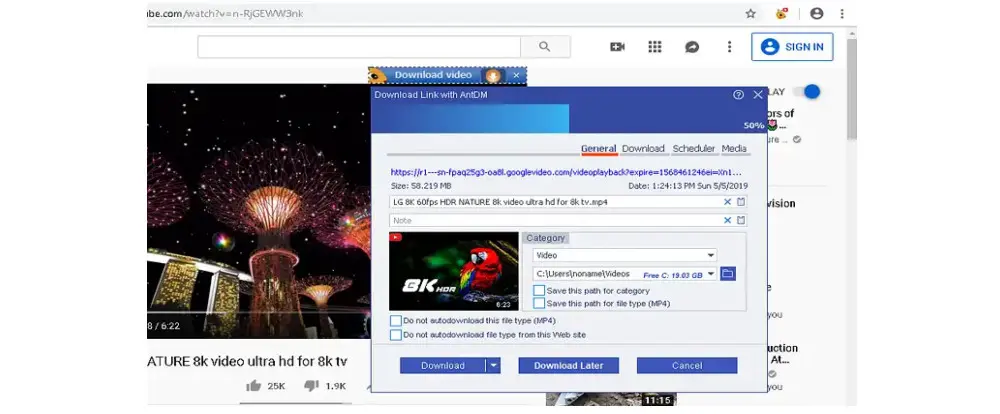
Though free, Ant DM might be the best free video downloader for advanced users. It can not only download videos from many sites but also helps manage your downloads. With full info about the downloaded file displayed, it gives you full control over the downloading process. For example, you can customize the downloading speed or schedule the download tasks. Other adjustable settings include proxy setup, system integration, download history, etc.
✔️ Pros:
Download videos from many popular sites
Customizable config for downloading
Choose between multiple qualities and formats
Download login-required videos
❌ Cons:
Its interface and settings seem overwhelming for beginners.
Platform: Windows, Mac
💰 Price: $29.99 yearly; $59.99 for a lifetime license

Featuring a simple interface, Allavsoft only needs 2 steps to download video, music, and subtitles from 1000+ websites. You can choose to download videos in their original format or convert them to other formats like MP4, AVI, WMV, MOV, TS, etc. Also, with a one-click conversion feature, you can extract the audio and save it in MP3, AAC, OGG, FLAC, or other formats.
✔️ Pros:
Easy and fast to use
Support 1000+ media-sharing sites
Include a converter and player
Support batch download and convert
Pause and resume downloading tasks
❌ Cons:
The free version of Allavsoft only supports downloading 5 videos, and it will ask you to upgrade every time you try to download a video.
This article has introduced 13 video downloader software. Each has unique features. Just select your preferred tool to get started! Finally, I hope this article is helpful to you. Thanks for reading till the end! Have a nice day!
WonderFox HD Video Converter Factory Pro
WonderFox HD Video Converter Factory Pro is a full-fledged software capable of dealing with all kinds of audio and video-related tasks. Not only can it easily batch convert 720p/1080p/2k/4k videos to 500+ formats and devices at full GPU-accelerated speed, with the highest quality possible, but also lets you perform super-fast online video downloading using URL.
* Please DO NOT use it to download any copy-protected videos for commercial use.

Privacy Policy | Copyright © 2009-2026 WonderFox Soft, Inc.All Rights Reserved
