
IFV File Player/Converter – How to Play IFV File Smoothly
 Recommended by the author
 How to & Tips
 Convert Video

 by Rocabella
Updated on Mar 25, 2026
How can we open IFV files on media players and devices? The answer is quite simple. All we need is a third-party IFV File Player and IFV Converter to convert IFV to MP4, AVI, MKV, or any other more common video format. Read on for more information.
👉 Download and install the recommended IFV File Player/Converter and get ready: https://www.videoconverterfactory.com/download/hd-video-converter-pro.exe https://www.videoconverterfactory.com/download/hd-video-converter-pro.exe
Q: I want to play my CCTV DVR video on my PC but failed. The format of video file is .ifv, and I searched many this like codec for that but nothing works. Please guide me on how to play IFV file.
A: An IFV file is an uncommon proprietary video format recorded by some DVR systems. Unfortunately, most mainstream media players such as VLC, MPC-HC, Windows Media Player, and iTunes do not support IFV video playback. Next, I will show you how to play IFV video and how to convert IFV to MP4, AVI and other compatible formats for broader device support.
In fact, there are very few tools that can directly play IFV files or convert IFV to MP4, but WonderFox HD Video Converter Factory Pro is an exception. It's a versatile audio and video converter that supports a wide range of formats and provides 500+ audio and video formats and device presets. With it, you can play IFV videos or convert them to MP4, AVI, MKV, and other common formats or device profiles. Now, free downloadfree download it and follow the steps below.

Free downloadFree download, install and launch WonderFox HD Video Converter Factory Pro on your PC. Enter the Converter window and click on Add Files or drag and drop to load IFV files into the program directly. You can click the Preview button on the left to play the IFV file in the built-in media player.
💡 To do batch conversion, you can add several files at the same time.
Click the Output Profile image on the right side to enter the format library. Go to the Video category and select the MP4 profile as the output format.
Now, click the ▼ button to set the output path. And finally, click the Run button to finish IFV to MP4 conversion.
Also Read: DAV File Player | Convert DAV Files to AVI, MP4 | Playing LVF File | VVF Player | TIVO to MP4 | DVR to MP4

Convert IFV File to MP4 Format
WonderFox HD Video Converter Factory Pro is highly recommended to convert IFV files to MP4 and many more formats. It also allows you to make some basic editing on the video file, such as trim, merge, crop, rotate, flip, watermark video, add special effects and subtitles. Download it to have a try!


To help you avoid downloading malicious programs bundled with viruses or other unwanted software when searching for a proper DVR player, I uploaded 2 IFV File Players’ setup file to Google Drive.
 IFV File Player
Step 1: Free download DVR IFV File Player from https://drive.google.com/file/d/1XveeCEEjCAhbjCnIH4XVDirvMGCUnsSI/view. Follow the prompts to install this software on your computer.
Step 2: Launch DVR Player, Click File > Open, or press Ctrl + O to load the IFV file into the program.
Step 3: Now, you can watch the IFV video smoothly.
💡 DVR Player only supports IFV video playback and does not support video conversion.
 How to Play and Convert IFV Files
Step 1: Free download MDVR Player from https://drive.google.com/open?id=1HdFPt6iq4cPYqSA0q4KSdCUbcN-CRlAP. Follow the prompts to install this software on your computer.
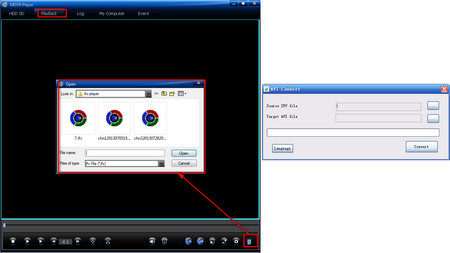
Step 2: Click on Playback on the menu bar, and then click on Open button on the right corner.
Step 3: Select the IFV video you want to play and click Open.
Step 4: How to convert IFV to AVI? There is an AVI Convert.exe in the root directory of the installation folder. Double-click to run the program and import the IFV file.
Step 5: Set the output path, and finally, click the Convert button to complete the IFV to AVI conversion.
At last...
That's all for now. I hope this article helps you play and convert IFV videos. In addition to playback and conversion, WonderFox HD Video Converter Factory Pro has many additional features that you might like:
1. You may get frustrated when YouTube pops up the message that YouTube is not available in your country, especially when you are addicted to specific blocked YouTube videos. With this YouTube downloader, you can fix this issue easily.
2. This software offers practical video enhancement features, making it easier to improve video quality.
3. It can also increase video volume to help make the video sound louder
If you like this software too, download it and explore more amazing features!

Convert DVD to AVI, MP4, MKV, etc. Easily
WonderFox DVD Ripper Pro
WonderFox DVD Ripper Pro is a very versatile DVD ripper. First of all, it can crack all the DVD encryption technologies, let you freely convert DVD disc to digital video formats including MP4, AVI, MKV, MOV and so on. In addition, it supports conversion of ISO image files and DVD Folder files. Download to experience it.



 Free Download
 Product Page
 Windows, 100% Clean!