
Best MTS Converter for Windows: WonderFox HD Video Converter Factory Pro


If you want to convert some AVCHD MTS videos recorded by your Sony or Panasonic HD camcorder to a more shareable or editable format, you’ve landed on the right page. Follow this article to get three excellent video converters to convert your MTS files to MP4, MOV, and more formats on Windows, Mac, and online.
Due to wide format and codec support, WonderFox HD Video Converter Factory Pro enables you to import virtually any video format and convert it into common file types ready for sharing and editing.
With this tool, you can convert MTS files into distribution formats such as MP4, MOV, and AVI, into editing formats like ProRes and H.264, or even into device presets that can ensure perfect compatibility between your videos and your specific devices. Also, it can extract audio from videos like MTS to MP3, WAV, and more.
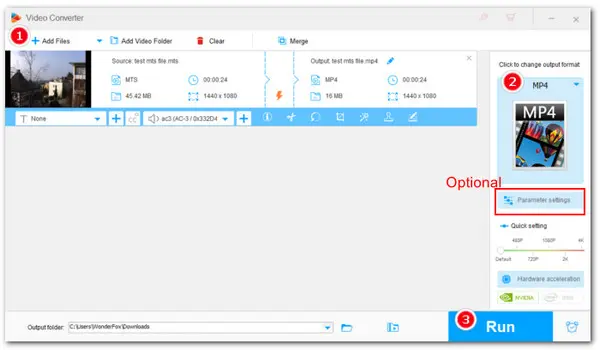
As an HD video converter, it can convert MTS files without compromising quality. Thanks to its support for hardware acceleration, the conversion speed is also fast. The conversion process is simple, and you can download this program now to convert your MTS files:
 Download for Free
Download for Free
Download for Free
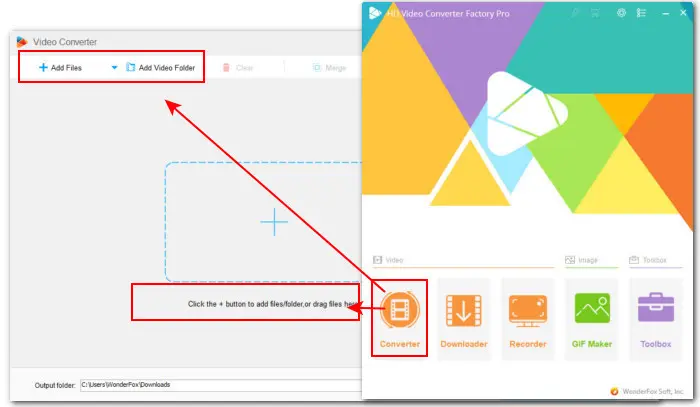
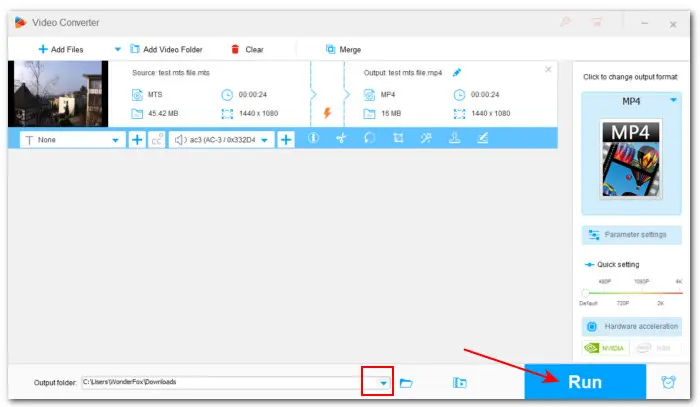
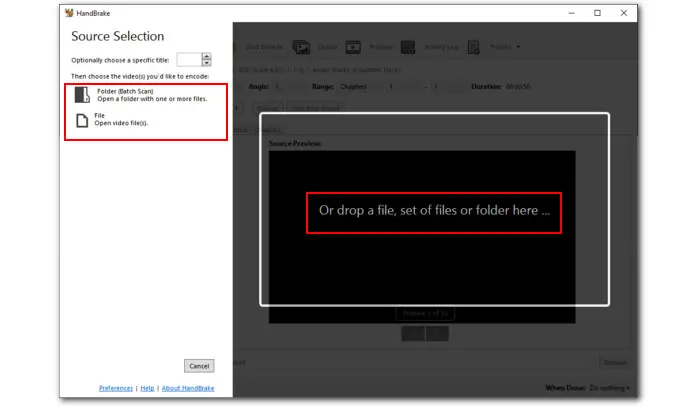
Step 1: Launch HD Video Converter Factory Pro and enter Converter. Click Add Files or Add Video Folder to import your MTS videos. You can also simply drag and drop them into the program.
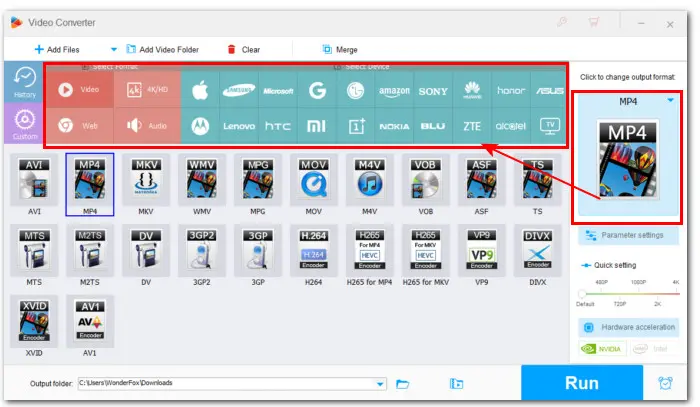
Step 2: Click the format image on the right side to open the format library. Go to the Video category and select the needed format. You can explore other sections to find more output options.
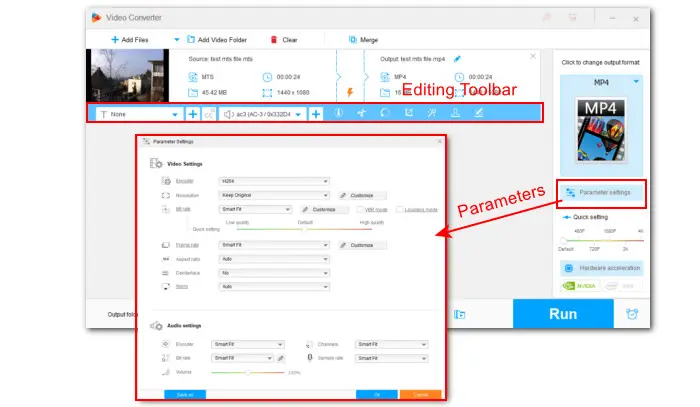
💡 For those who have specific requirements on encoding settings, they can enter Parameter setting to modify encoder, resolution, bitrate, fps, sample rate, audio channel, etc.
You can also use the editing toolbar to trim, crop, rotate, watermark, add effects, attach subtitles, and do more.
Step 3: Hit the ▼ button at the bottom of the program to choose an output folder. Finally, click Run to start converting MTS videos to the selected format.
Permute is a high-quality video converter designed for Mac. It’s very powerful yet extremely easy to use. You can simply drag and drop your MTS files into its interface to start converting.
The export formats include MP4 (H.264 and HEVC), MOV (ProRes, H.264, and HEVC), MKV, and AVI, as well as a variety of presets tailored for different Apple devices. At the same time, it ensures that the final video output remains crisp and sharp after converting your MTS files.
Let’s see how you can convert an MTS files in Permute:
Step 1: Download Permute here: https://software.charliemonroe.net/.
Step 2: Open the app and drag your MTS file into the interface.
Step 3: Click the Video drop-down menu and select the needed format or device.
Step 4: Click the Start button to begin the conversion process.
CloudConvert is a popular online platform that provides fast and easy solutions to convert different types of files including video, audio, image, document, PDF, archive, e-book, and more.
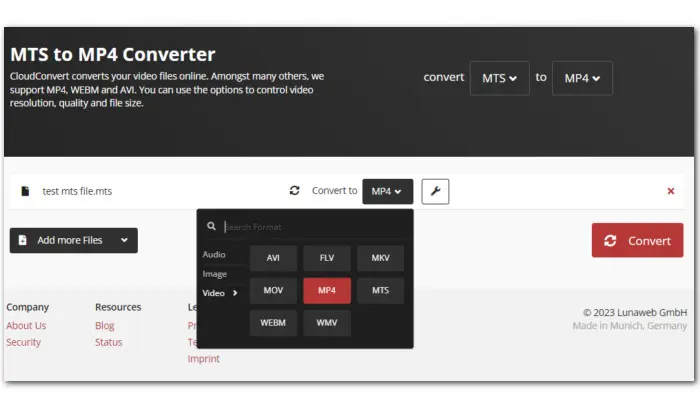
With this online converter for MTS files, you can convert .mts video files to 3GP, AVI, MKV, MOV, MP4, WMV, Android, iPad, iPhone, etc. Moreover, you can upload files up to 1GB in total for conversion. Let’s see how to convert MTS files with CloudConvert below:
Step 1: Visit CloudConvert: https://cloudconvert.com/mts-converter
Step 2: Click the arrow icon near the Select File button to load the video file from local drive, Google Drive, Dropbox, OneDrive, or URL.
Step 3: Click the wrench icon to adjust the output settings and click OK to confirm the changes.
Step 4: Hit the Convert button to start converting MTS files online.
Step 5: Once the conversion is done, download the converted file to a local drive.
With the three video conversion tools above, you should have no problem converting MTS files to your wanted format. These tools can also be useful converting other formats in your daily life. So just choose your suitable tool to get started. For Windows users, you can get HD Video Converter Factory Pro right here:
Download for Free
Download for Free

I write about multimedia topics, including video and audio conversion, compression, editing, and downloading. I joined WonderFox in 2020, and my goal is to help readers solve everyday tech problems more easily. In this article, I shared with you three solutions to convert MTS files on Windows, Mac, and online separately. You should have no problem turning your MTS video to your wanted format now!


I write about multimedia topics, including video and audio conversion, compression, editing, and downloading. I joined WonderFox in 2020, and my goal is to help readers solve everyday tech problems more easily. In this article, I shared with you three solutions to convert MTS files on Windows, Mac, and online separately. You should have no problem turning your MTS video to your wanted format now!
 Download for Free
Download for Free
Download for Free

Terms and Conditions | Privacy Policy | License Agreement | Copyright © 2009-2026 WonderFox Soft, Inc.All Rights Reserved